
上周末,我们徒步旅行了美丽的 Palisades Hudson 河路 。这是一个 4 英里的旅程, 穿越森林和攀登巨大的岩石,包括一个名为“巨型楼梯”的部分。如果攀登都这些不足以提高你,那我不知道什么会了。
当我们享受着沿途迂回路径惊人的风景,惊叹于巨型(和不是那么巨大的)岩石时,我只是瞥了一眼手机。是的,我知道。我是互联网世界所奴役的那些生物之一。有一条消息来自我们的客户,他正在执行周末数据迁移,并迫切地需要添加额外的容量到他们的 DMS 许可证上。
正如我的上一篇文章中所描述的,我们的 CDS 有“智能许可”。客户购买适合特定类型迁移的迁移能力。 通常,他们已经确定了迁移工作需要多少兆字节,并且提前购买了容量许可证。
有时,客户可能低估了他们迁移所需的数据量,然后找我们购买额外的迁移量。另一种更经常发生的情况是,在用完初始项目的购买能力后,客户觉得使用 DMS 迁移数据非常容易,On occasion, a customer may have underestimated the amount of data they needed to migrate, and will come back to us to purchase additional migration capacity. Another scenario that occurs more frequently is that after using up the purchased capacity for their initial project, customers are extremely pleased with how easy it is to migrate their data using DMS and decide to put other data that was originally planned for other migration tools into the DMS process. This means we often get unexpected requests for additional migration capacity license.
We actually anticipated these situations early on, and when building our in-house support infrastructure, we created and integrated a system that allows requests for licensing materials to be processed quickly. When the requests come in from the customer or partner, the support manager and sales executives are notified immediately. Through the web portal, we can immediately review and approve these requests. In a few seconds, the proper license package is created automatically, and the person who made the request will be notified that the license package – which is just a simple file – is ready for download.
Specifically, these are the steps involved:
- Request received, executives are notified.
- Responding executives access the CDS web portal via computer, tablet, or smartphone, and review and approve the request through the portal.
- Once approved, the request is forwarded automatically to the license server, where the proper package is constructed as follows:
- Package is created with proper license items, e.g., number of terabytes, for the specific key requiring the capacity
- Package is digitally signed using the root private key
- Signed package is deposited into the download area for the requesting party
- Requesting party is notified of license package availability
- The file now can be downloaded and emailed to the customer.
- Once received, the customer just imports the license package into the license key using the DMS GUI.
So, facing the spectacular Hudson River view, with smartphone in hand, I simply approved the license request, and was feeling sorry for the customers who were busy working over the holiday weekend to migrate their data. Although DMS is a non-disruptive, no-downtime migration tool, some cautious customers always configure/schedule their migration sessions to occur during the least busy hours. At the very least, since the process of setting up migrations is so simple, I can imagine they could just quickly create the sessions with our wizard, then get out and enjoy the rest of the nice weekend.
The whole license approval process took a couple of minutes. But just after I confirmed the license had been processed, a heavy thunderstorm came from out of nowhere. With no cover in the area available, we were totally drenched by the downpour, and so was the smartphone. However, I was not concerned because I knew at least one other CDS manager would be sensible enough to be somewhere else nice, away from the mercurial weather, and could handle additional requests if needed. By this point, spending the weekend indoors to migrate data did not sound like such a bad idea after all.
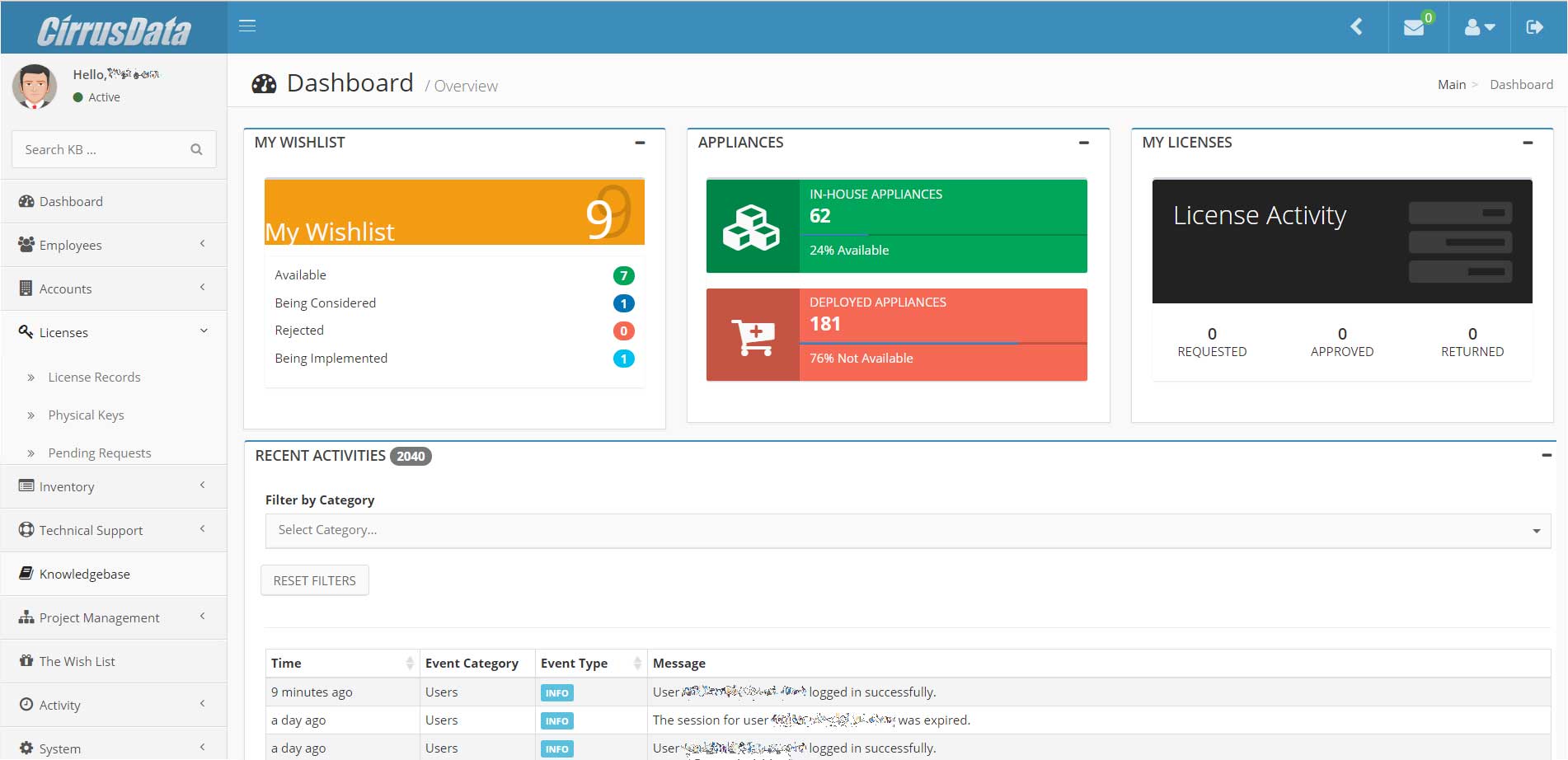 While we are on the topic of support infrastructure, CDS has actually built an extensive system – including customer account management, project management, license management, technical support, and more. All these systems are integrated, and all the services are provided through a web portal we call the CDS Business Support Infrastructure, or BSI. Some of our people questioned why it was necessary for us to build our own system when there was existing software that may have achieved the same purpose. Since we have a complex operation, we felt it was important to create something that met all of our needs, where information regarding the entire picture of each customer and partner account could be kept in one location.
First, as described, our license scheme is truly unique, and we believe it’s second to none. The totally integrated nature of the BSI supports the license operation from its core, as illustrated. For customers that purchase license capacity in bulk, we allow a credit account to be set up, so that they can simply “withdraw” capacity license through the provided portal.
Second, we frequently provide standby support for our partners and customers when they install DMS and configure migration sessions. To review customer configurations, we simply ask for the X-Ray, which is provided via a built-in function in the DMS GUI. When the X-Ray is invoked, a snapshot of the system is created, including all log entries, as well as the state of the nexus and migration sessions (no user data or confidential information is included). This X-Ray package is then uploaded to BSI, through a web page known as the DropZone. Directly from BSI, we can then “mount” any one of these provided X-Rays, which effectively installs the snapshot of the customer system onto one of our virtual DMS appliances and allows access to the GUI for review. We can “see” the exact same view as the user, with most of the relevant information present. This way if there is any issue, or if any particular attention is required, we can identify and communicate efficiently and accurately, allowing us to provide the most effective support to our partners and customers.
Another important BSI function is project management. Each migration operation starts as a “project” in the portal. The project provides step by step operational instructions, reminders, and records of actions taken, information collected, and milestones achieved. In addition, journals are kept for any specific events or updates, either directly from the portal, or simply by email to our “Support Bot,” where journal entries are automatically created from emails.
There are many more functions to BSI, but suffice it to say that no other software could work this well with our operation. Many of these features will be soon made available to our partners and customers, who will be able to use the Partner Portal to manage their projects, licenses, and project related information – including X-Rays and the use of X-Ray viewers.
And best of all, we can go on weekend hiking trips (note to self: don’t forget to bring poncho), while at the same time take care of customer exigencies in a confident manner – all made possible by a great infrastructure.
Palisades Trail image courtesy of Famartin (Own work)